Introduction
Roughly 33% of ICU patients can’t speak. They use AAC only 11% of the time. The eligible population is awake, alert, cognitively intact — and silenced by an endotracheal tube, a fresh tracheostomy, post-stroke aphasia, or jaw and throat surgery. They can hear their family. They can hear their care team discussing their treatment. And they cannot answer.
I built OwnVoice to close that 22-point gap.
OwnVoice is a browser-based AAC (augmentative and alternative communication) application designed for hospital tablets. A nurse opens a URL, types the patient’s first name, and — optionally — uploads a 15-second voice sample from a voicemail, a video, or any audio the family has on their phone. Within minutes, the patient can tap a phrase and hear it spoken in their own voice. No app store. No IT ticket. No data leaves the tablet.
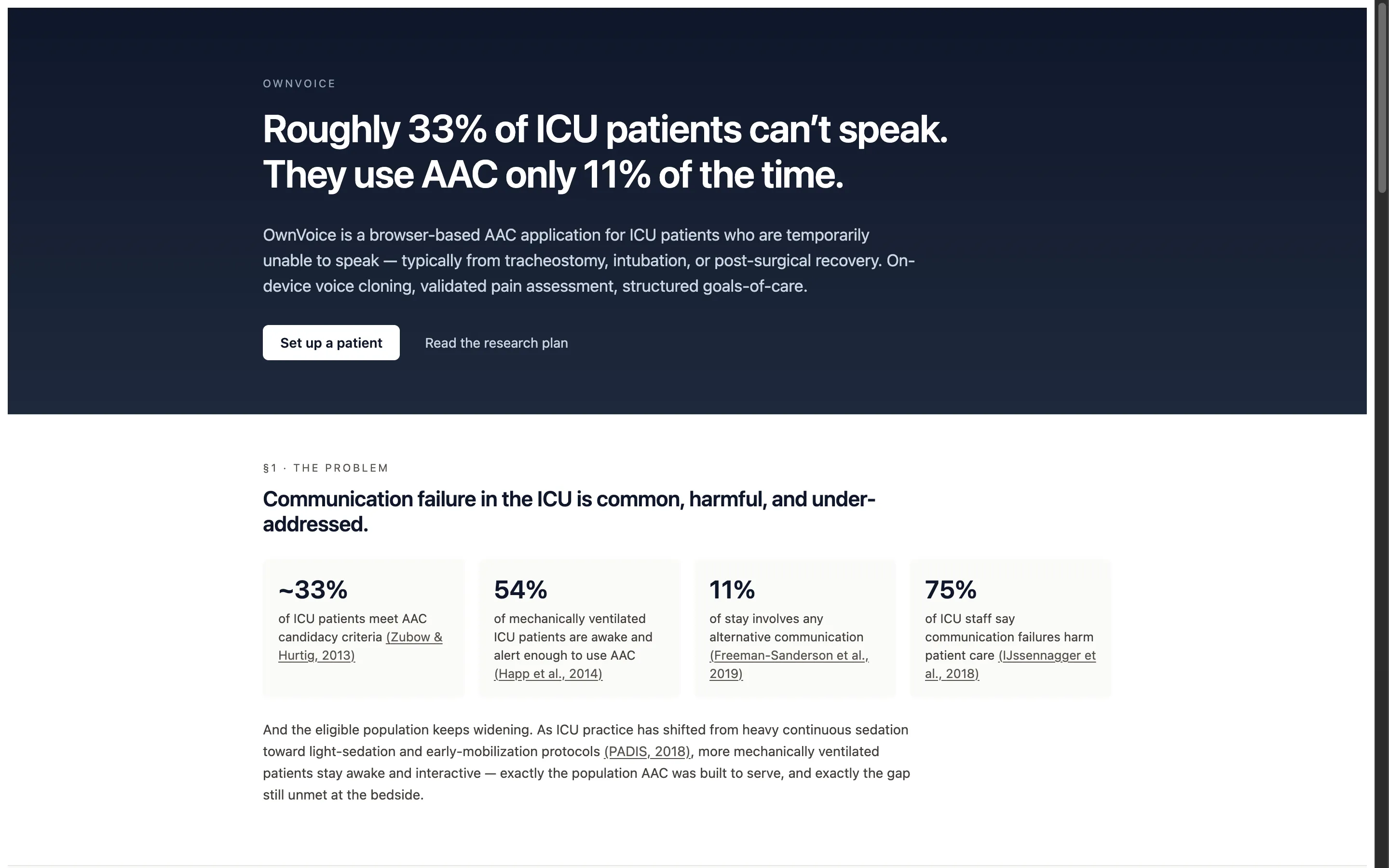
The public-facing homepage at ownvoice.icu. The opening stat block is built entirely on cited primary sources from critical-care literature (Zubow & Hurtig 2013; Happ et al. 2014; Freeman-Sanderson et al. 2019; IJssennagger et al. 2018).
This case study covers the v0.1 prototype: the research that shaped the product, the on-device architecture that makes it possible, and the design decisions that came out of imagining a sedated, frightened patient using this for the first time.
A note on state. The app has been built — it’s a working v0.1 prototype demonstrating every capability described in this case study, and you can try it at ownvoice.icu/app. The clinical validation study (described in §Evolution & Roadmap) has been drafted as a protocol but is not yet IRB-submitted. No real patient has used this in a clinical setting. The “what worked” and “what didn’t” reflections below are honest design lessons from building the product against the literature and clinical frameworks — not findings from the bedside.
OwnVoice end-to-end pipeline — reference audio in, patient's reconstructed voice out, all on a single tablet.
THE CHALLENGE
The starting point was a blunt observation from the literature: in a landmark study screening mechanically ventilated patients, Happ et al. (2014) found that 54% were awake and alert enough to use AAC during their stay. Earlier demographic work by Zubow & Hurtig (2013) put broader hospitalized AAC candidacy at ~33%. As modern critical care has shifted away from heavy continuous sedation toward light-sedation and early-mobilization protocols (PADIS, 2018), that population has grown. And yet observational data from Freeman-Sanderson et al. (2019) shows AAC is used during only 11% of the typical stay.
The existing toolkit fails in specific, predictable ways:
WHY EXISTING TOOLS FAIL
1. Communication boards (laminated cards, picture grids)
- Slow — pointing letter by letter takes minutes per sentence
- Impersonal — no way to express tone or emotion
- Monolingual — the bedside resource almost always assumes English literacy
- Require fine motor control the patient may not have
2. Existing AAC apps
- Generic robotic TTS — the same voice for every patient creates emotional distance
- App Store + MDM deployment — days or weeks to provision through hospital IT
- One-way — pre-built phrase libraries with no real provider response surface
- Treat goals-of-care conversations as out of scope
3. Hardware speech-generating devices
- $1,500+ per unit, English-focused, dedicated hardware that competes with the patient’s actual hospital tablet
- Procurement timelines incompatible with a 4-day ICU stay
What caregivers consistently report is more than functional — it’s emotional. A generic synthesized voice telling a daughter “I love you” lands very differently from her mother’s voice saying it. The technology had finally caught up to the point where a patient’s real voice could be reconstructed from a few seconds of audio. Nobody had yet packaged that into something a nurse could deploy in 60 seconds at the bedside.
Discovery & Research
Two parallel tracks of research shaped the product. The first was the technology question — could on-device voice cloning genuinely run on a hospital tablet in 2026, or was this still a cloud-only capability? The second was the clinical reality — what does an ICU patient actually need to say, and which validated frameworks already exist for the hardest conversations?
Track 1: On-device inference
Voice cloning had a watershed year in 2025. A class of zero-shot, multilingual TTS models — Chatterbox Multilingual, NeuTTS Air, Voxtral, Qwen3-TTS, Fish Audio S2 — reached the point where 3-15 seconds of reference audio produced output that listeners struggled to distinguish from the original speaker. The remaining question was deployment.
The constraints made the answer non-obvious:
- HIPAA. Voice samples and patient utterances are PHI. Cloud transcription and synthesis create a compliance surface that slows hospital adoption from days to quarters.
- Hospital WiFi is unreliable. Wards may be partially firewalled. The app cannot break when the network does.
- Latency. A patient saying “I can’t breathe” cannot wait 800ms for a round-trip. Speed is a clinical requirement, not a UX nicety.
All three constraints point to the same answer: run the inference on the device. The arrival of WebGPU in Safari 26 on iPadOS 26, mapped to Metal on Apple Silicon, made this feasible in the browser without a native app. ONNX Runtime Web with the WebGPU execution provider became the inference layer; OPFS (Origin Private File System) became the model store; a Service Worker handles the offline shell.
All inference, storage, and audio pipeline runs in the browser. Nothing leaves the tablet.
Track 2: The clinical frameworks
The second track was harder. I’m not a clinician. Building a serious tool for an acute-care setting demanded that I treat clinical validity as a hard constraint, not a future enhancement. Two open-licensed frameworks ended up doing most of the heavy lifting:
- Emoji-FPS (Li et al., JMIR 2023, CC-BY 4.0) — A 6-face emoji pain scale at levels 0/2/4/6/8/10. Spearman ρ 0.91-0.95 correlation with Wong-Baker FACES, NRS, VAS, and FPS-R in adult surgery patients. Cross-platform consistency validated across iOS, Android, Microsoft, and OpenMoji rendering. Open-licensed, no royalties, no negotiation.
- SICG — Serious Illness Conversation Guide (Ariadne Labs, CC-BY-NC-SA 4.0) — The validated 7-topic framework powering the “My Wishes” feature. Used in 1.8M+ conversations worldwide; resulted in 89% vs 44% rates of values/goals conversations and meaningful reductions in patient anxiety and depression in clinical trials. The clinical structure is preserved unmodified; OwnVoice provides the patient-side response surface for a framework typically delivered as a clinician-led conversation.
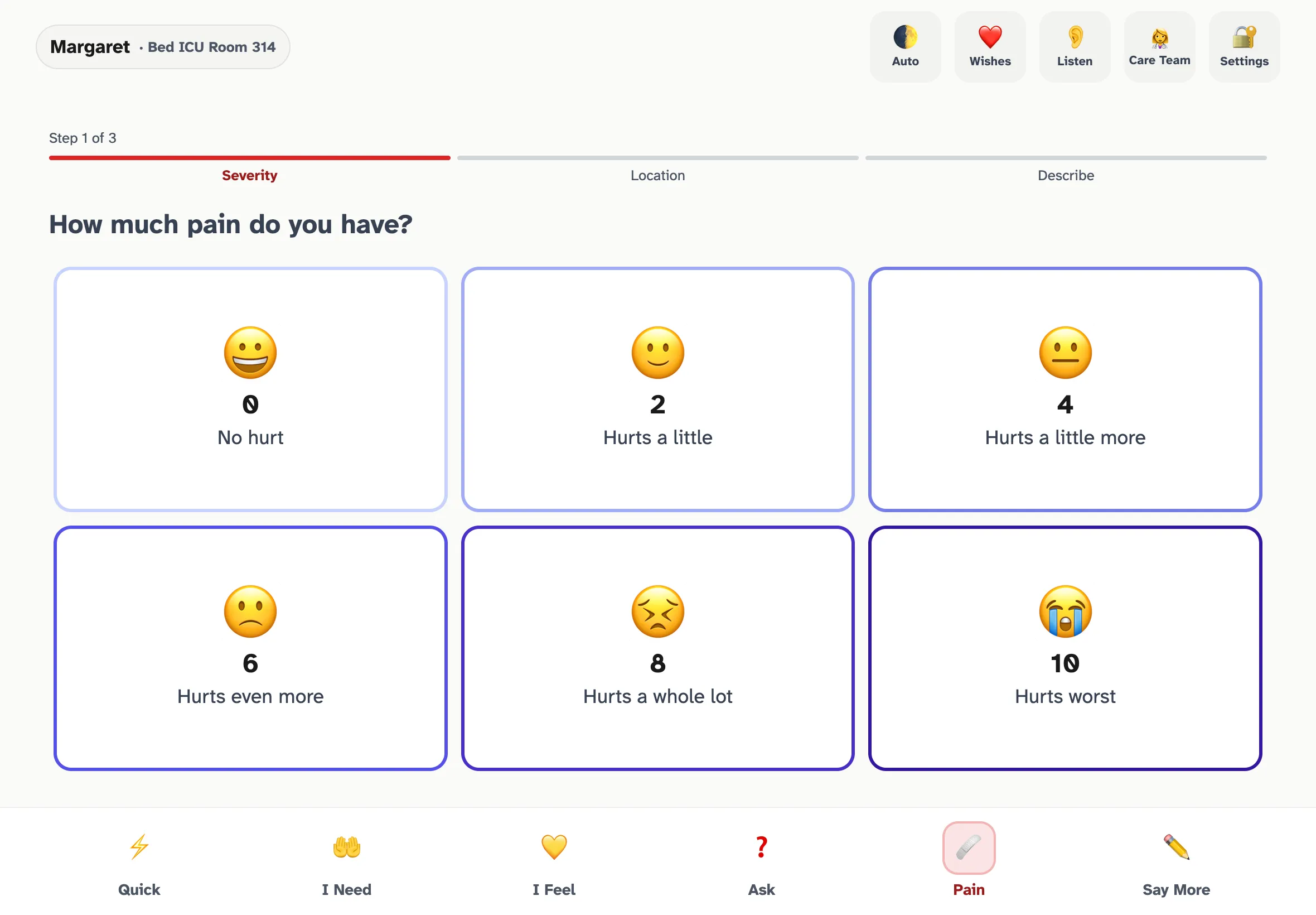
The Emoji-FPS pain scale rendered in OwnVoice. Step 1 of 3 in the guided pain flow — severity, then location, then descriptor — constructs a complete sentence the patient speaks aloud in their own voice.
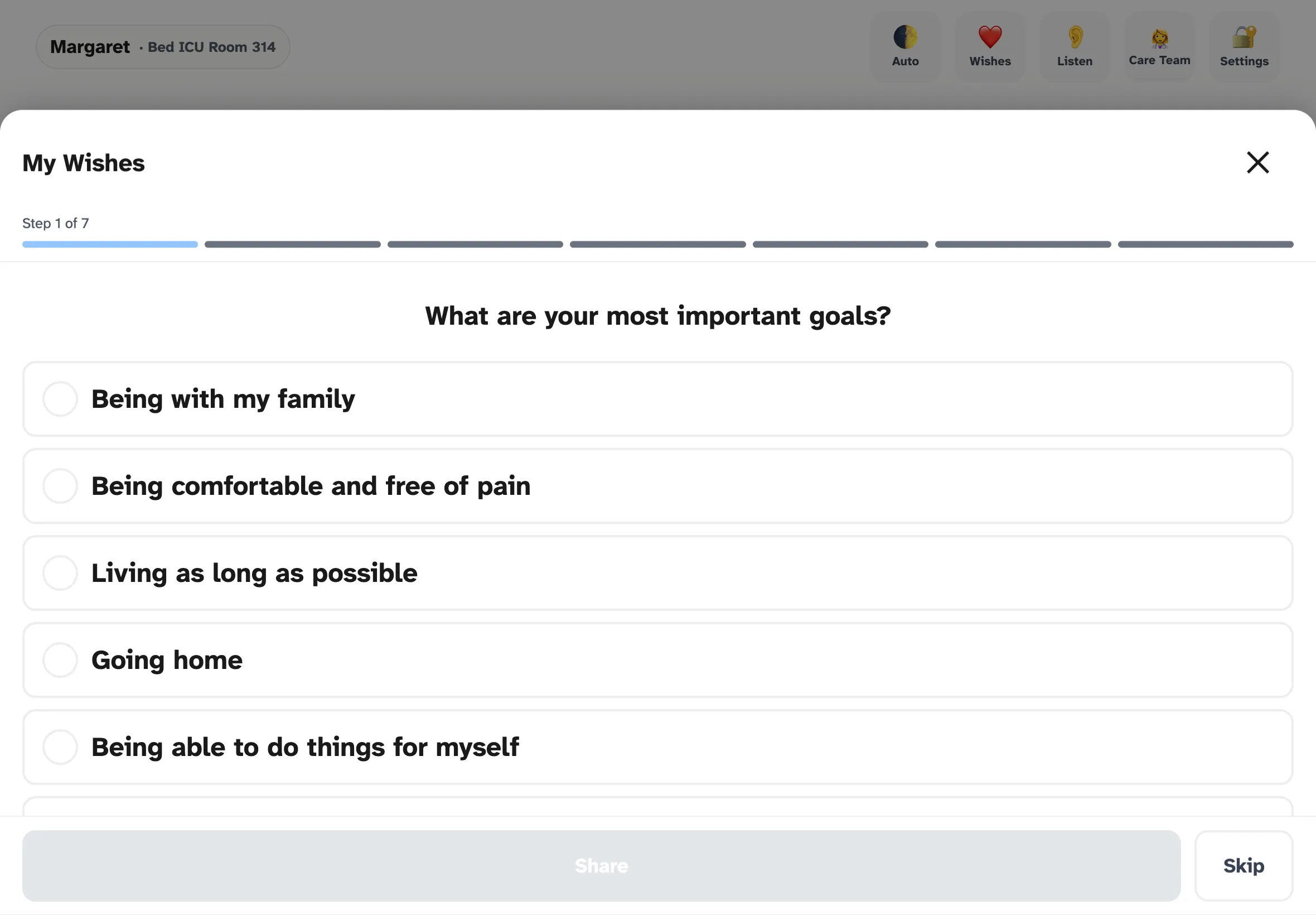
My Wishes — the SICG-aligned goals-of-care flow. Each topic mirrors one of the seven EXPLORE prompts from Ariadne Labs' framework, surfaced as patient-tappable responses.
Design principles that came out of the research
Six principles emerged that shape every later decision in the product:
- Speed is safety. “I can’t breathe” cannot wait 2 seconds. Phrase playback must feel instant — soundboard-level latency.
- Zero deployment friction. A URL, not an app. No IT involvement to start using it. Enterprise features layer on; they don’t gate access.
- The patient’s voice matters. Personal voice is the emotional center of the product. Everything else is table stakes.
- Offline by default. Hospital WiFi is unreliable. The app must function fully without network after initial load.
- Nothing leaves the device. No PHI is ever transmitted. Voice models live and die on the tablet.
- Two-way, not one-way. Communication is a conversation. The provider’s voice and responses are first-class features, not afterthoughts.
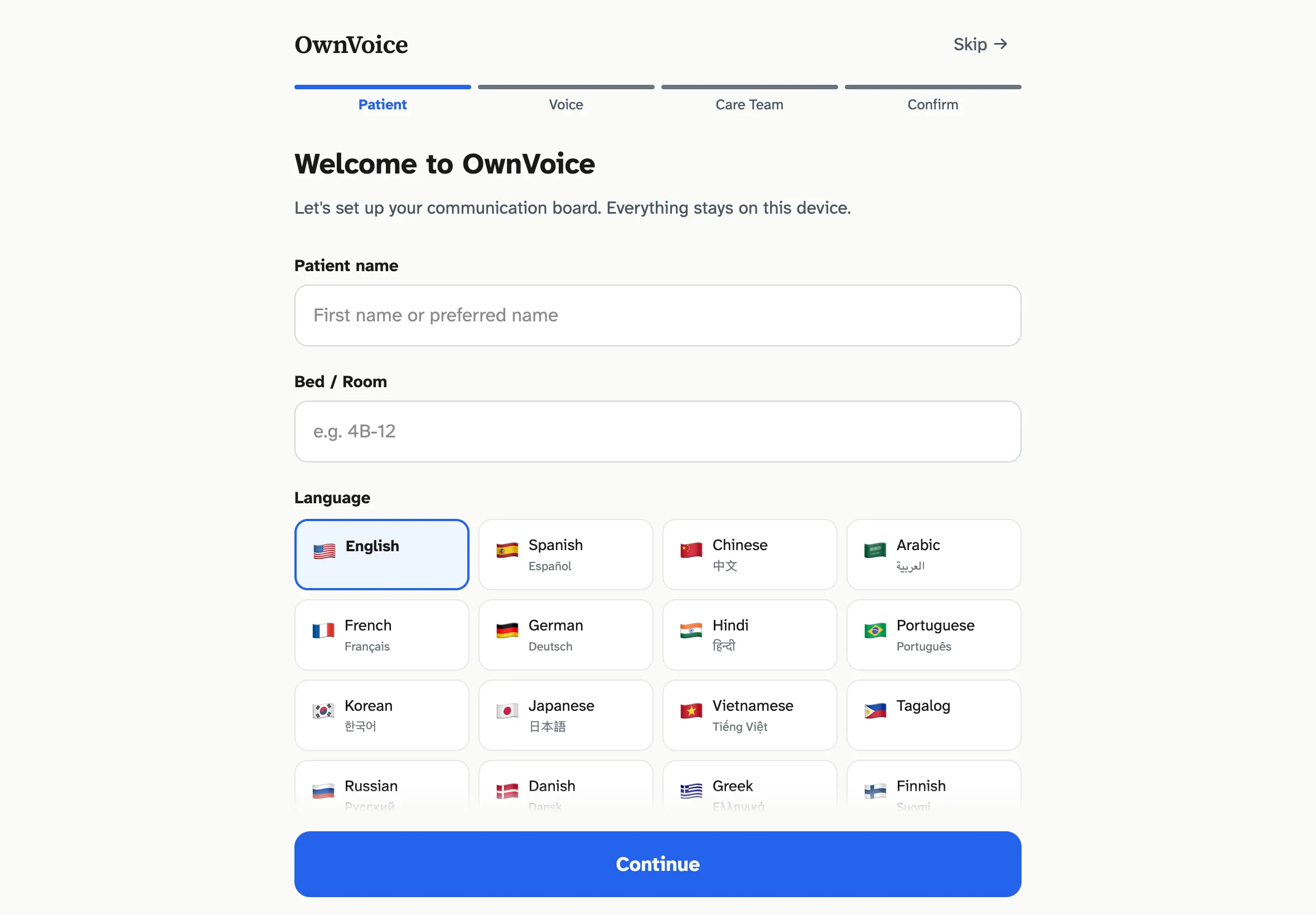
Step 1 of the setup wizard. Patient name, room, and language — the only required step. The "Skip setup" link in the header is intentional: a nurse in a hurry can hand the patient a working app in under 10 seconds.
Build & Iterate
Three design problems forced the most interesting iteration: achieving sub-50ms latency on phrase playback, capturing a clean voice sample from a sedated patient, and deciding what language whose voice should speak when the patient and the caregiver don’t share a first language.
Latency tiers: the playback architecture
Real-time TTS inference is budgeted at 300-800ms on M5 silicon — a design target, not yet measured against a production workload. That’s adequate for a typed custom message but unacceptable for “I’m in pain.” The solution was to stop treating real-time synthesis as the default path and start treating it as the fallback.
After enrollment, the app pre-generates ~150 fixed phrases as compressed audio clips against the patient's embedding. Most taps never hit the inference path.
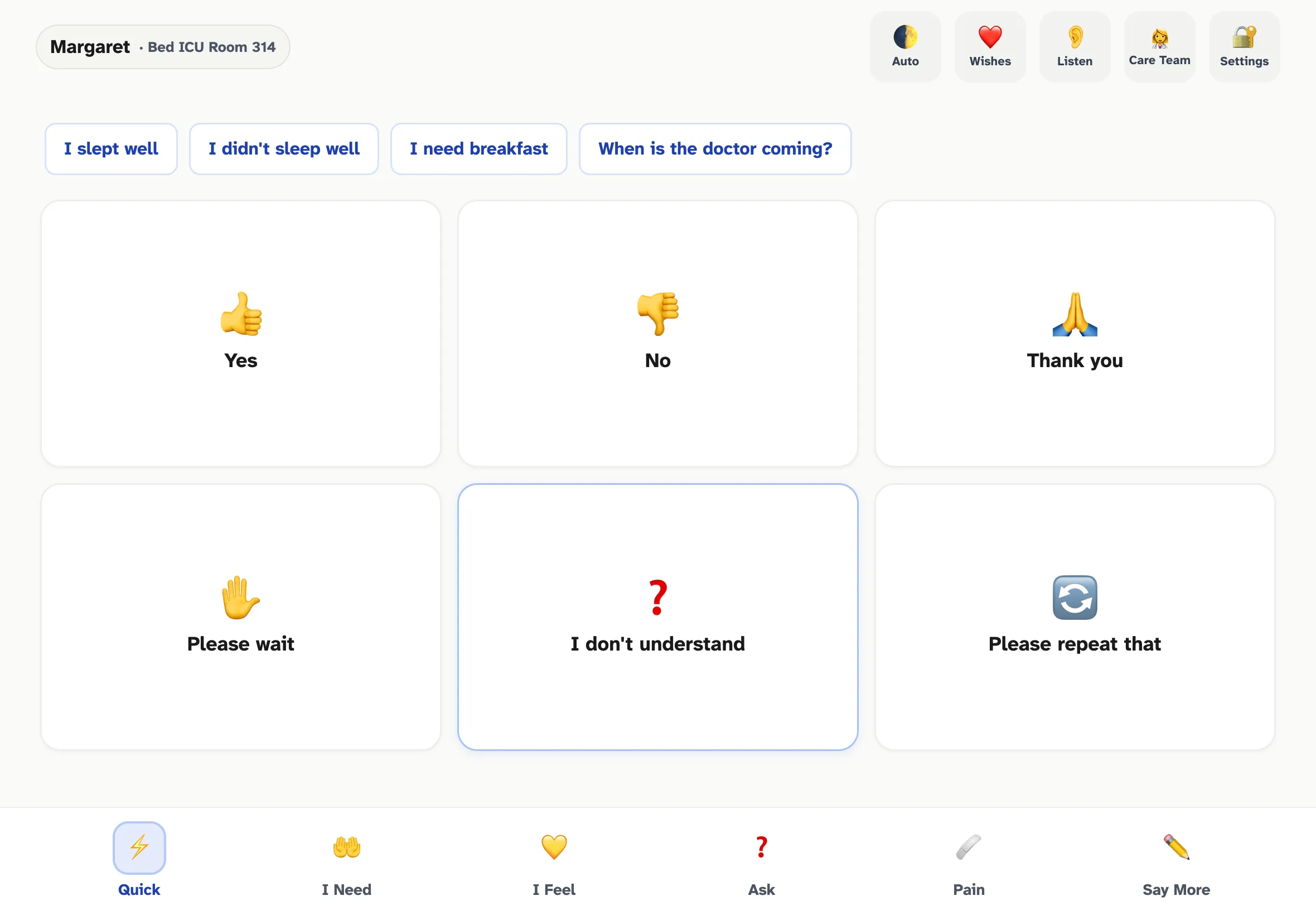
The Quick tab — the Tier 1 hot path. Six high-frequency phrases as 64x64+ touch targets, plus four time-of-day contextual suggestions at the top. Every tap here plays from cached audio in under 50ms.
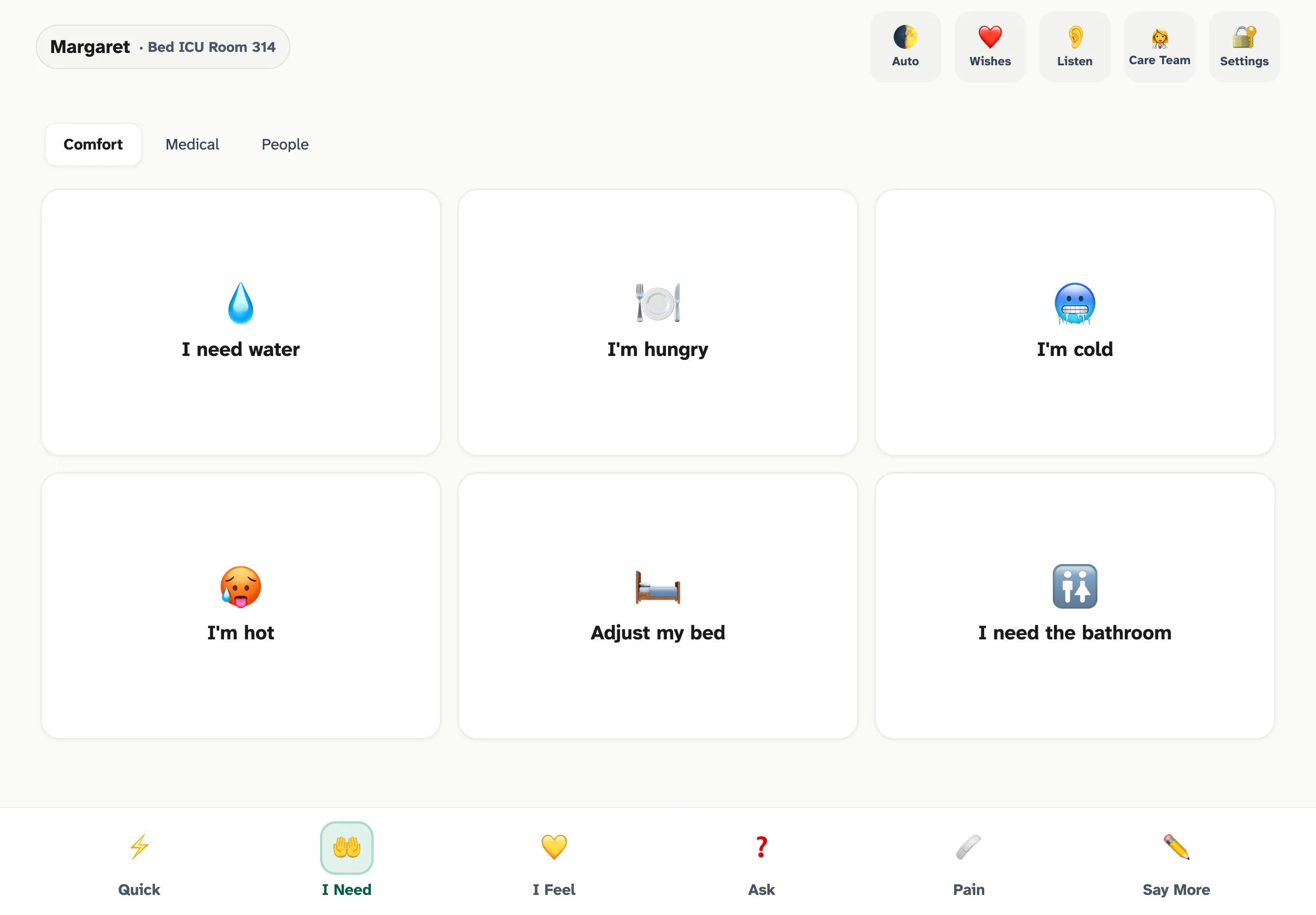
I Need — comfort, medical, and people subcategories. Same single-tap pattern, same Tier 1 latency budget.
The trade-off is enrollment time: ~3-5 minutes of background generation after a voice is captured. The app is usable from the first second — uncached phrases fall back to Web Speech — and quietly upgrades phrase by phrase as cached clips become available. A subtle progress indicator (“Preparing Margaret’s voice… 47/150”) gives the nurse a status without making the patient wait.
The pre-recording sequence: capturing a voice sample from a frightened patient
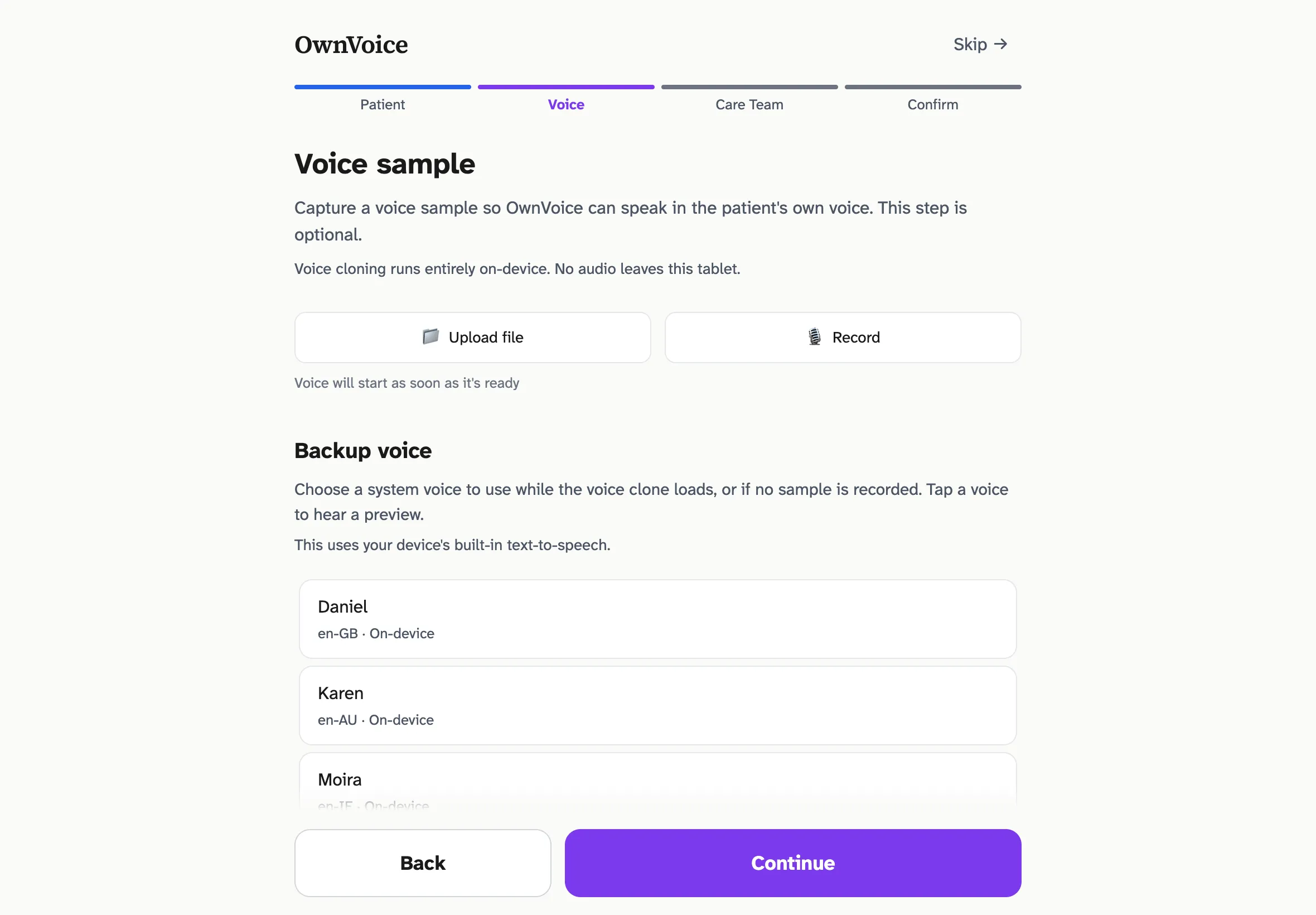
The voice-sample step of setup. The system always offers a fallback — the patient has a working voice from the first second, even before the clone is ready.
The first version of the recording flow was, frankly, wrong. It went straight from “tap to record” to a 15-second timer. The flow worked when I tested it on myself; it broke the moment I imagined the actual user. An ICU patient — sedated, weak, anxious about being recorded, possibly never having read into a microphone in their life — needs orientation before the clock starts, not just a countdown. The mismatch between “works for the developer” and “works for a frightened patient” is exactly the kind of gap that the literature on AAC adoption (Happ et al., LaValley et al.) catalogues over and over.
The current sequence walks the patient through about 33 seconds of preparation before the 15-second recording begins. The actual COUNTDOWN_TIMELINE in VoiceCapture.tsx has these phases:
- “You’re about to read a sentence out loud.” — 3.8s, with a 396 Hz tone
- Silent breathing beat with a pulsing amber dot — 1.5s, so the UI doesn’t look frozen
- ”Take a few deep breaths.” — 3.8s, with a 432 Hz tone
- Two paced inhale/exhale cycles — 4 × 4s = 16s, to actually let the patient breathe
- ”Ready.” — 2.3s, with a 528 Hz tone
- 5 → 4 → 3 → 2 → 1 countdown — 1.2s per numeral with a 440 Hz tone (494 Hz on “1”)
- “Begin” cue — 659 Hz tone — recording starts; the Rainbow Passage script appears; timer counts up to 15s
Two material details:
- The card uses a warm amber palette, not red. Red signals clinical alarm and duplicates the visual language of error states — exactly the wrong association for “we are about to record your voice.”
- Auditory cues are sine-wave tones, not synthesized speech. Synthesized speech would compete with the patient’s own voice about to be captured. A calming progression of pitches (396 / 432 / 528 Hz, then 440 Hz countdown, resolving with 659 Hz “begin”) feels less clinical and uses long fade envelopes to avoid startle.
The script itself is the opening of the Rainbow Passage (Fairbanks, 1960) — a phonetically balanced paragraph engineered for proportional English phoneme coverage. Chatterbox Multilingual encodes the speaker via a CAMPPlus 192-dim x-vector that statistically summarizes spectrum, pitch, and formants averaged across the clip. Phonetic diversity in the reference directly shapes what the clone can sound like — monotone 15 seconds of free-form speech systematically under-captures the patient’s pitch range. The Rainbow Passage runs ~14 seconds at conversational pace and reliably elicits a wider phonetic distribution than improvised speech.
”When the sunlight strikes raindrops in the air, they act like a prism and form a rainbow. The rainbow is a division of white light into many beautiful colors.”
An escape hatch is always available — “Or speak naturally — anything works.” Free-form speech still produces a usable embedding; quality is just slightly reduced. The system has to handle the patient who can read the sentence and the patient who cannot.
The voice-direction model: who speaks which language?
The thorniest design question was bilingual: when the patient is a Spanish speaker and the nurse is an English speaker, whose voice speaks which language?
The first design had the patient’s cloned voice speak in the patient’s language — the obvious mapping. Then the obvious problem surfaced once I sat with a concrete bilingual case: the bedside caregiver wouldn’t understand a word of it. In an ICU, where most communication is acute and time-sensitive, the patient’s utterances need to reach the caregiver in real time — not via an interpreter line that takes 8 minutes to connect. (This is something I’ll want to validate with palliative-care and critical-care reviewers before clinical pilot, but the direction reads cleanly against the literature.)
The revised model:
- The patient’s cloned voice speaks in the caregiver’s language. Phrases on the patient surface display in the patient’s language.
- The provider’s cloned voice speaks in the patient’s language. Phrases on the provider surface display in the caregiver’s language.
- The conversation thread shows both languages for every utterance (primary + smaller gloss) when the locales differ.
A patient hears their nurse’s voice in their own language. A nurse hears the patient’s voice in English. Modern zero-shot TTS supports cross-lingual voice cloning natively — the speaker embedding extracted from English audio drives Spanish synthesis using the same voice characteristics — so the technical path was already there. The product question was just figuring out which direction was clinically useful.
Two-way communication: builder + listen
Most existing AAC apps stop at “the patient taps; the patient speaks.” OwnVoice was deliberately designed as a two-way communication tool, with two surfaces that close the loop.
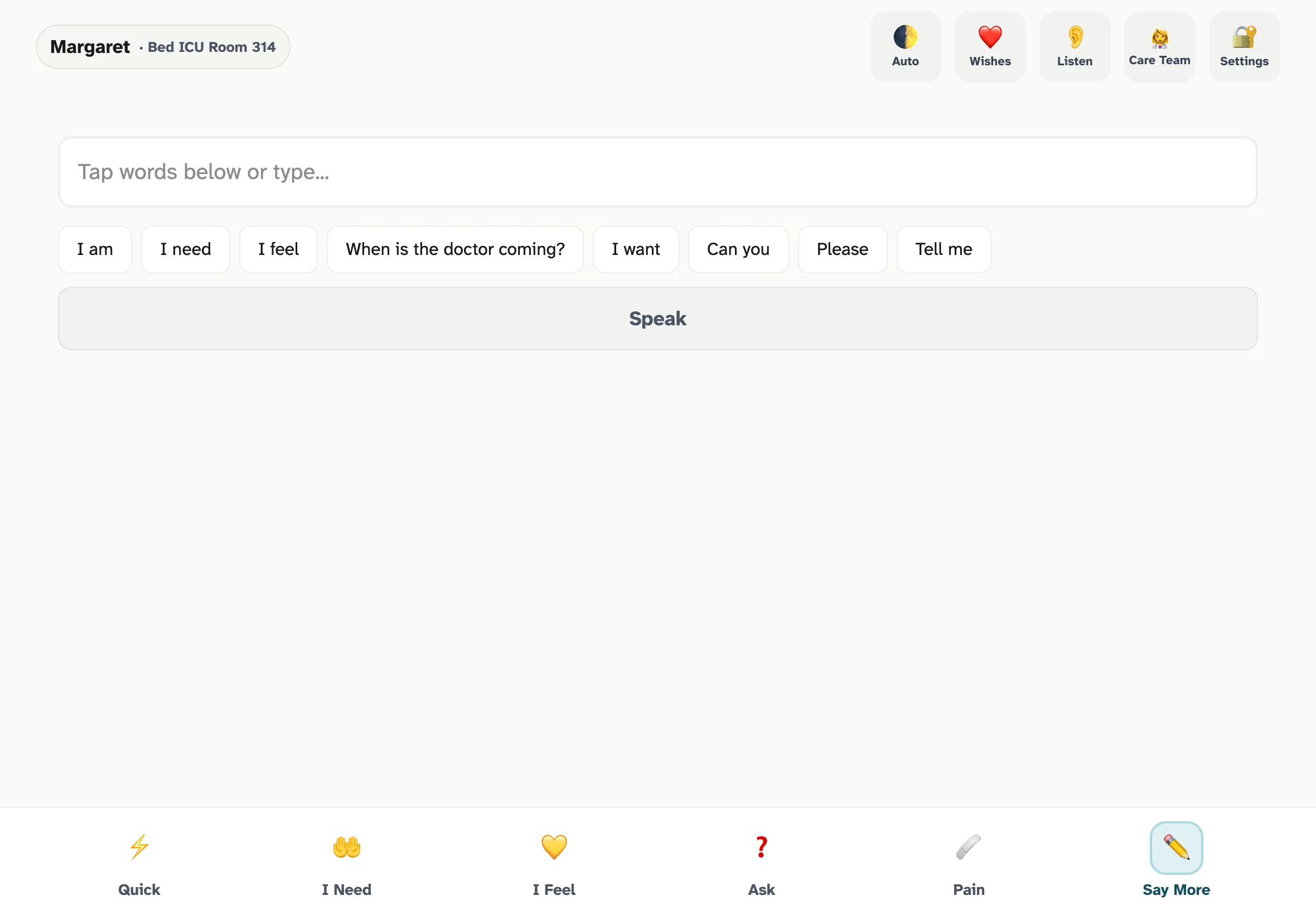
Say More — the progressive sentence builder. When the phrase library doesn't cover what the patient needs to say, an on-device LLM generates 6-8 contextually relevant continuations per tap. Sub-200ms refresh keeps it conversational.
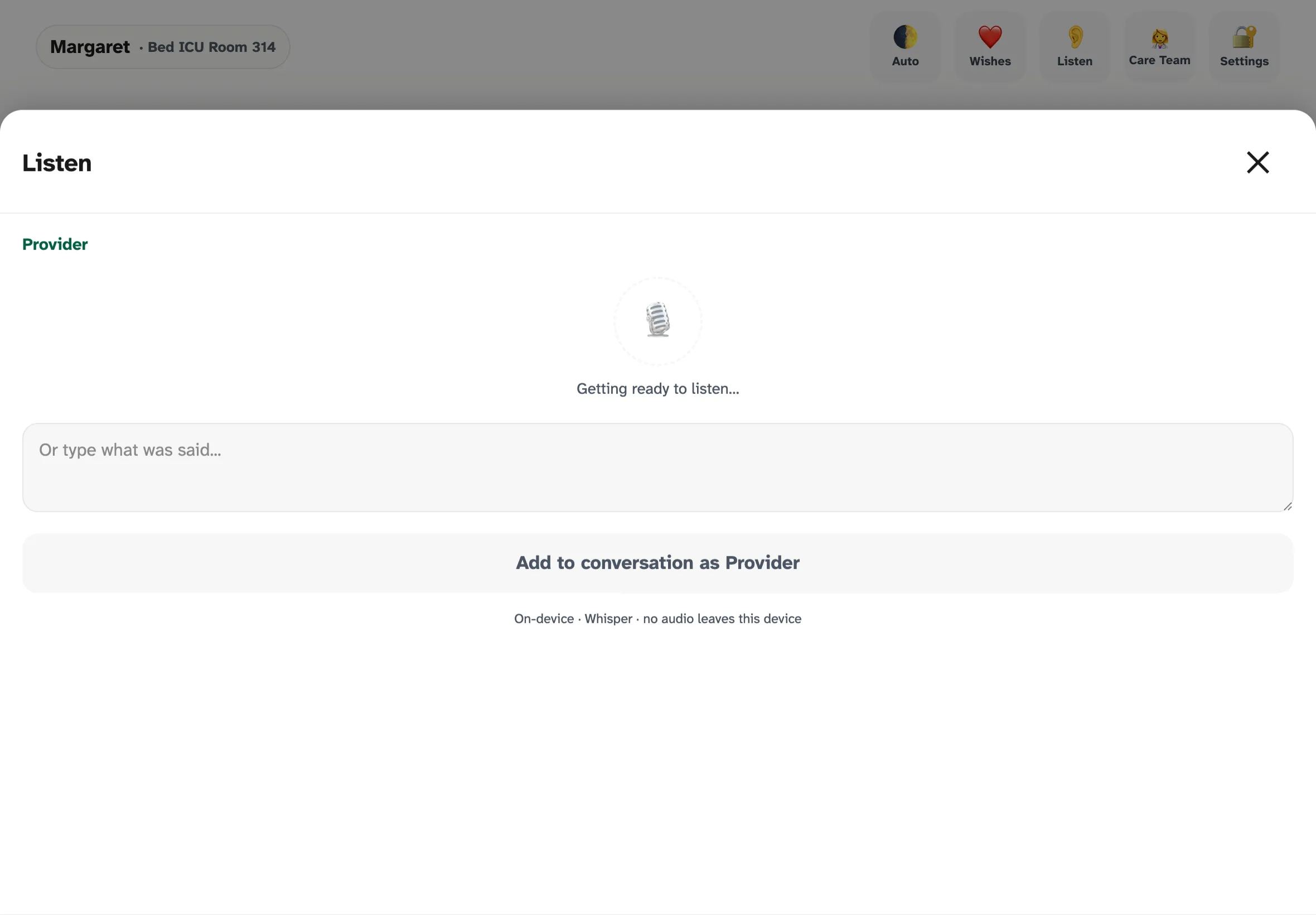
Listen — on-device Whisper transcribes provider speech directly into the conversation thread. The transcript is editable before posting so the nurse can correct any recognition errors. No audio ever leaves the tablet, which is the only way this is HIPAA-tractable.
The architectural decisions that look load-bearing
Three architectural choices ended up doing disproportionate work in the prototype. Whether they hold up under real ward conditions is a question the pilot will answer:
- Service Worker scoped to /app/. The marketing homepage at
/has no PWA registration. The app at/app/has a Service Worker scoped tightly so it never accidentally caches the wrong shell. The split is enabled by aService-Worker-Allowed: /app/header inpublic/_headers. - OPFS-backed model store with Range-resumable downloads. Initial primer downloads ~2-2.5 GB of model weights (Chatterbox Multilingual ~1.2 GB, LFM2.5 1.2B ~850 MB, Whisper small ~300 MB). Hospital WiFi will drop.
resumableDownload.tsstreams via HTTP Range and resumes from the last successful byte.integrityCheck.tsvalidates ONNX magic bytes and file sizes against a manifest at boot. - Cloudflare R2 + Pages Functions for asset hosting. Workers proxy R2 reads to same-origin
/ort/*and/models/*URLs. The Service Worker intercepts those and serves directly from OPFS once primed. Thedist/output stays under Cloudflare Pages’ 25 MiB-per-file ceiling because a postbuild script strips the large weights and lets the Pages Function serve them at runtime from R2.
Key Insights
Several lessons came out of this build that I wouldn’t have predicted at the start:
What worked in the build
These are observations from constructing the prototype against the literature, not findings from clinical use.
The browser is now a credible inference target
WebGPU on Safari 26 changed what is plausible to ship without an app store. A multilingual zero-shot TTS model running entirely in-browser, on-device, with HIPAA-safe data handling, was a research demo two years ago. It is now a deployable product. For any tool where privacy or deployment friction matters, this is a different trade space than even 12 months ago.
Validated clinical frameworks are leverage
Building from Emoji-FPS and SICG meant I wasn’t inventing a pain scale or a goals-of-care conversation structure. Those exist, they’re validated, and they’re open-licensed. The product’s job is to be a faithful response surface for them, not to replace the clinical thinking. This is the right deal for any non-clinician building clinical software: ride existing validation, don’t fabricate it.
Pre-generated audio collapses the latency problem
Treating real-time synthesis as the fallback — not the default — was the single highest-leverage architectural decision. The TTS model never has to be fast enough to satisfy “I can’t breathe.” It just has to be fast enough that the background prep finishes before the patient gets to phrases beyond the most common 150.
Designing for the most-impaired user upgrades the product for everyone
The pre-recording sequence, the 64×64px touch targets on the patient surface, single-tap-only interactions, the indigo-only pain ramp (rather than red-green, for colorblindness), Atkinson Hyperlegible body text at 18px per the design guidelines — every accommodation should improve the product for everyone, not just the most-impaired user. Whether that bears out in clinical use is a question for the pilot. None of this is hidden behind an “accessibility mode.”
What didn’t work in the build
The “what didn’t work” items below are design iterations during construction — moments where a v0 assumption broke once I sat with the actual user — not failures observed in patient care.
The first recording flow assumed a healthy speaker
”Tap to record → 15-second timer” works for a podcaster. It does not work for a sedated patient with a fresh tracheostomy. The redesigned pre-recording sequence added ~15 seconds before recording starts — net negative for healthy speakers, net positive for the actual user.
Free-form speech was the wrong reference default
I expected the script to feel clinical and the free-form option to be the comfortable default. The phonetics literature on x-vector speaker embeddings argued the other way — a script removes the cognitive load of “what should I say?” and produces measurably better embeddings. The Rainbow Passage is now the primary path; free-form is the escape hatch.
The first bilingual model was backwards
The patient-speaks-in-patient-language model was the obvious mapping and almost certainly the wrong one given how acute ICU communication is. This was a useful reminder that clinical context overrides UX intuition when they conflict. Talking to reviewers who have stood at the bedside — nurses, palliative-care physicians — needs to happen before clinical pilot, not after.
Visual alarm language is hard to escape
The first version of the recording card used red as a “you are recording” affordance, mirroring conventions from consumer apps. In a hospital, red is alarm, error, critical — all the wrong associations. Amber became the right answer, but it took three iterations to fully pull red out of the surface.
Design Pivots During Build
- Recording flow originally lacked orientation; redesigned for a sedated patient, not a developer testing on themselves
- Defaulted to free-form speech; switched to a phonetically balanced script after reading the speaker-embedding literature
- Mapped patient voice to patient language; reversed it once the bilingual ICU case was concretely sketched
- Used red recording affordances; pulled red out of the surface entirely after sitting with the clinical visual-language conflict
What hasn’t happened yet (and is the next milestone)
- IRB submission — the protocol is drafted but not yet under review
- Real patient testing — no one in clinical care has used this app yet
- Bedside review by nurses, palliative-care physicians, and speech-language pathologists
- Clinical co-design of “My Wishes” response options with palliative-care reviewers
- Clinically-balanced reference passages for the 23 cloning-supported locales beyond English
Open Risks
- Browser eviction of cached models — mitigated by
navigator.storage.persist(), but not eliminated - Safari WebGPU bugs and limitations on iPadOS — ONNX Runtime Web falls back to WASM automatically, but parity isn’t guaranteed
- Voice cloning quality on extremely degraded reference audio (whispered, breathy, post-extubation hoarse) is an open question requiring clinical study
- The “My Wishes” feature requires palliative-care co-design before clinical deployment — the SICG framework is validated, but the response options are starting points only
Evolution & Roadmap
The product has reached the end of the build phase. The clinical-validation phase is drafted but has not started. Where we are on the four-phase roadmap:
Where the project actually is
What’s done:
- The v0.1 prototype is built and runs at ownvoice.icu/app. Voice cloning, pain scale, SICG flow, sentence builder, on-device STT — all of it works in a browser.
- The marketing/research site at ownvoice.icu presents the case for the work, with cited primary sources.
- The clinical validation study protocol (a prospective, single-center, mixed-methods design with five aims covering CSRI, voice identity, SICG feasibility, on-device latency, and nursing workflow) is drafted.
What’s next:
- IRB submission. The protocol is drafted but not yet submitted. This is the immediate next step.
- Clinical co-design. The “My Wishes” response options need palliative-care, bioethics, and chaplaincy review before a patient ever sees them.
- Pilot deployment. Pending IRB approval, a structured pilot in 1-2 hospital units — an ICU, a step-down, or a med-surg ward. The deliverables would be nurse and patient feedback on the bedside experience, refinement of the phrase library against actual clinical vocabulary, and a baseline measurement of communication quality and patient satisfaction.
Near-term: getting to first patient
The work between here and a real bedside is unglamorous and necessary: IRB review, partnership conversations with hospital systems, clinical co-design with palliative-care specialists, and the small forest of compliance documentation that any tool entering acute care has to produce. The product hasn’t earned the right to be at a bedside yet — it has to earn it through clinical review.
Medium-term: multilingual depth
OwnVoice has 13 production-reviewed locales today, plus 11 more registered as DRAFT machine translations awaiting native-speaker and clinical review (24 locales total in the registry). Voice cloning is offered on the 23 locales Chatterbox Multilingual supports; for the rest, the language picker badges entries as “System voice only” and the device’s built-in TTS handles speech. The product roadmap includes co-designing balanced reference passages (analogous to the Rainbow Passage) with native speakers and clinicians for each supported locale, since “free-speak” coaching produces measurably weaker embeddings than a phonetically balanced read.
Long-term: integrating into the chart
OwnVoice today is a closed loop — the conversation thread lives on the tablet and clears when the patient is reset. The medium-term opportunity is to feed structured pain reports, SICG responses, and provider-spoken transcripts into the EHR via FHIR-compatible endpoints, with explicit patient and proxy consent. Today, when a patient reports “sharp pain in my chest, level 8 out of 10” through the pain flow, the nurse hears it but the chart records nothing. That’s a real loss in care continuity that the product is positioned to fix without changing the bedside experience.
What this case study is really about
The technical architecture — the latency tiers, the OPFS model store, the WebGPU inference path — is what makes the product possible. It is not what the product is about.
The product is about a daughter hearing her mother say “I love you” in her mother’s voice, when the doctors have given the family hours rather than days. It is about a patient being able to refuse a treatment they don’t want, in their own voice, instead of being talked about over their hospital bed. It is about half a million people each year who have something to say and currently no way to say it.
The prototype is now built. What remains — IRB review, clinical co-design, a real bedside — is the work this case study cannot yet describe.